


Gimkit changed how students experience quiz games in the classroom. Instead of fast, one-round quizzes, it introduced strategy, upgrades, and in-game currency, keeping students engaged for longer periods. For many teachers, Gimkit feels like a big upgrade from simple quiz tools.
However, as classrooms evolve, many educators start looking beyond game mechanics. They want richer academic question types, calmer practice modes, curriculum-aligned AI support that actually matches standards, real homework workflows, and reports that help guide instruction. This is where Gimkit can start to feel limited.
If you like Gimkit’s engagement but want stronger teaching support around it, this guide is for you. Below are the 10 best Gimkit alternatives to explore in 2025, with pros, cons, pricing, and why each platform may be a better fit for different classroom needs.
Explore Gimkit at a Glance
Gimkit is a game-based quiz platform where students answer questions to earn in-game currency (often called Cash or GimBucks), which they then spend on upgrades and power-ups inside modes like Fishtopia, Tag, Snowbrawl, Boss Battle, and more. It leans heavily into a “video game” experience during learning time.
Students like Gimkit because it:
Feels like playing a game rather than taking a quiz
Uses upgrades, power-ups, and strategy to stay exciting
Rewards persistence, not just speed
Teachers like Gimkit because it:
Gets even disengaged students participating
Works for live games, centers, and basic assignments
Is easy to host with simple game codes
At its best, Gimkit is great for engagement and review, especially for older elementary and middle school students who like game mechanics.
Why Look for Gimkit Alternatives?
Gimkit is engaging and game-driven, but many teachers look for alternatives when they need stronger instructional support. Common reasons include:
Absence of opinion polls and limited question types makes it hard to assess K-12-based skills and a deeper understanding.
AI question creation is fast, but not properly curriculum-aligned.
Heavy focus on upgrades and in-game strategy can distract students from the actual learning.
Assignments and advanced classroom features are locked behind paid plans.
Reporting focuses on scores and gameplay results, not learning gaps or misconceptions.
List of the Top 10 Gimkit Alternatives
Here are 10 strong Gimkit alternatives to explore in 2025:
1. Tarphi: Best Gimkit Alternative for K–12 Classrooms
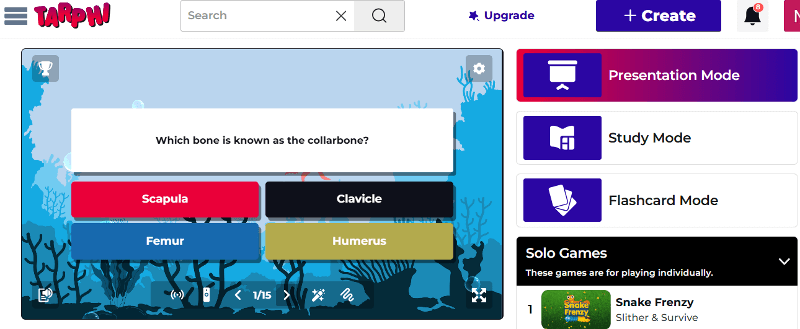
Tarphi is a classroom-focused teaching and learning platform built specifically for K–12 instruction. Unlike Gimkit, which centers on gameplay, Tarphi supports the full teaching cycle: Create > Present > Assign > Assess.
Teachers can build quizzes, slides, and opinion polls manually, import content from Google Slides, PowerPoint, or PDFs, or generate activities using curriculum-aligned AI. The same content can then be reused across Presentation Mode, Study Mode, Flashcards, Solo Games, and Competitive Games.
Pros of Tarphi
Supports deeper academic question types
Saves time with curriculum-aligned AI
Includes opinion polls and feedback for proper formative assessment
Provides detailed reporting and analytics to guide reteaching
Encourages participation without speed pressure
Pricing of Tarphi
Tarphi offers three flexible pricing plans: Basic, Standard, and Pro. The Basic plan is free. For individuals, Standard costs $7/month or $60/year ($5/month billed annually), and Pro costs $10/month or $96/year ($8/month billed annually). School plans are available at $55/year (Standard) and $90/year (Pro) per seat.
Why Tarphi Is a Better Alternative to Gimkit
Tarphi keeps engagement high with its games while adding everything Gimkit lacks for daily teaching: curriculum-aligned AI, richer question types, multiple learning modes, real homework controls, answer explanations, and actionable reports. It works as a complete teaching platform, not just a game.
2. Kahoot
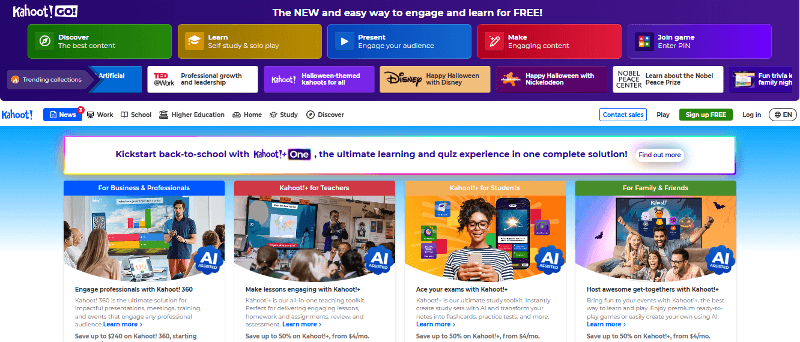
Kahoot is one of the most famous names in gamified learning. It turns quizzes into fast, competitive challenges where speed and accuracy decide who tops the leaderboard.
Pros of Kahoot
Very easy to set up and host live games
Large library of community-made quiz sets
Supports a wide range of question types
Great for instant engagement in large classes or groups
Cons of Kahoot
Still heavily focused on speed, which can stress some students
Limited question formats for deeper academic assessment
AI creation is faster but not curriculum-aligned
Reporting focus only on scores than long-term learning growth
Pricing of Kahoot
Kahoot uses a tiered pricing model where the free plan is very limited, and paid plans range from about $3 to $19 per month. As teachers need more players, AI tools, question types, and better reports, they must move to higher tiers, so costs increase quickly just to access basic teaching and assessment features.
3. Blooket
Blooket wraps quiz questions inside colorful, arcade-style games. Students answer questions to earn points, coins, or advantages, then use them in modes like Gold Quest, Tower Defense, Café, and Factory.
Pros of Blooket
Highly engaging visuals and avatars
Simple setup and kid-friendly design
Works well for review and rewards
Cons of Blooket
Limitedquestion formats lacks proper assessment
AI creation is not highly curriculum-focused
Focuses more on game mechanics than explanation or feedback
Reports are simple and not built for deep instructional planning
Pricing of Blooket
Blooket has a free Starter plan. Paid plans begin with Plus at $4.99/month billed annually ($59.88/year), and Plus Flex costs $9.99/month for monthly billing. Group bundles are also available for schools.
4. Wayground (formerly Quizizz)
Wayground (the new name for Quizizz) is a lesson and practice platform that lets teachers build quizzes, lessons, and assignments using questions, slides, videos, and passages. It works well for both live games and self-paced practice.
Pros of Wayground
Supports multiple activities and question types
AI can generate questions by subject, grade, standards, and DOK level
Strong for homework and self-paced practice.
Accessibility tools make practice more meaningful and inclusive.
Cons of Wayground
Free plan limits how many resources you can keep or reuse
Less game excitement than Gimkit
Pricing of Wayground
Wayground offers a Basic plan for free, an Individual plan billed at $12 per month or $144 annually, and custom pricing options for schools and universities.
5. Mentimeter
Mentimeter is an interactive presentation platform used widely in universities, PD sessions, and workshops. It focuses on polls, word clouds, rating scales, quizzes, and Q&A, all inside slide decks.
Pros of Mentimeter
Clean, professional slide designs
Great for live polls, word clouds, and Q&A
Anonymous participation encourages shy learners or staff
Easy exports of session summaries to review later
Cons of Mentimeter
Not designed for K-12 instruction
No structured homework or long-term assignment workflows
Limited question formats for true skills practice
Reporting focuses on session snapshots, not ongoing mastery
Pricing of Mentimeter
Mentimeter has a free plan with limited slides. The Basic education plan costs about €10 per month, and the Pro plan costs about €16 per month (billed yearly). Institutional “Campus” plans provide additional features and administrative tools.
6. Wooclap
Wooclap is an audience interaction platform designed for higher education, lectures, and training sessions. Here, you create an “event” and mix different activity types into it: multiple choice, open questions, word clouds, image labeling, brainstorming, polls, and more.
Pros of Wooclap
Wide range of interaction types
Good for real-time feedback in large groups
Built for large lectures and professional events
Works properly with presentations
Cons of Wooclap
Not built for daily classroom teaching
No true homework system with deadlines and multiple attempts
Reporting emphasizes participation, not detailed student mastery
Pricing of Wooclap
Wooclap offers a free plan with limits. The Education Basic plan is $7.99/month, and the Education Pro plan is $14.99/month (billed annually). Institutions can purchase custom enterprise plans with unlimited participants and integrations.
7. Quizlet
Quizlet is a self-study and flashcard platform used globally for memorization and review. Students use it to learn vocabulary, terms, definitions, formulas, dates, and more.
Pros of Quizlet
Simple and accessible on almost any device
Supports multiple study modes
Adaptive practice that focuses more on what students don’t know yet
Cons of Quizlet
Focuses mostly on memorization, not real learning
Limited live classroom gameplay and collaboration options
Pricing of Quizlet
Quizlet has a free plan with ads and core features. Quizlet Plus (premium) removes ads and unlocks additional features; in many regions, it’s typically around $35.99 per year for individual users.
8. Slides With Friends
Slides With Friends is an interactive slide-based tool that lets you run lessons, quizzes, icebreakers, and review games right from a slide deck. Students join from their device, usually via link or QR code.
Pros of Slides With Friends
Extremely fast setup
Great for warm-ups, interactive lessons, and discussion
Free plan is quite generous for small classes or groups
Cons of Slides With Friends
Not suitable as a full K-12 learning platform
Limited analytics compared with platforms focused on assessment
Best for live sessions, not long-term course management
Pricing of Slides With Friends
Slide With Friends has a free plan with limited slides. Paid plans cost about $5-$10 per month, unlocking unlimited slides, custom themes, and premium features.
9. AhaSlides
AhaSlides is another interactive presentation tool that lets you mix slides, polls, quizzes, surveys, and Q&A into one live deck. Students join via link or QR code and answer in real time.
Pros of AhaSlides
Clean, modern interface that works well in remote or hybrid settings
Easy for participants to join from any device
Good for lectures, webinars, PD, and large classes
Cons of AhaSlides
Not built for K–12 standards or long-term skill mastery
Analytics are basic compared with dedicated assessment tools
No structured homework or assignment system
Pricing of AhaSlides
AhaSlides pricing includes a Free plan ($0) for 50 participants, an Essential plan at $7.95/month for 100 participants, a Pro (AI) plan at $15.95/month for 2,500 participants, and a custom-priced Enterprise plan for large organisations.
10. Nearpod
Nearpod is a lesson-delivery platform that turns your slides, videos, and PDFs into interactive classroom lessons. Instead of focusing on game rounds like Gimkit, it’s built for teaching full lessons with checks for understanding during instruction, and student-paced practice for homework or remote learning.
Pros of Nearpod
Strong lesson modes: Live Participation, Student-Paced, and Front-of-Class
Huge library of ready-made, standards-aligned lessons
Good for classroom instruction, not just review games
Cons of Nearpod
Less “game energy” than Gimkit, so it’s not ideal for reward-day style play
Students find it less exciting because it’s mostly teacher-paced
Most advanced features and larger class limits require paid plans
Pricing of Nearpod
Nearpod has a free Silver plan. Paid individual plans include Gold at $159/year and Platinum at $397/year. Schools and districts use custom-priced licenses with expanded features and higher student limits.
Conclusion
Gimkit is excellent at what it does: turning quizzes into strategic, video-game-style experiences. But it isn’t the right answer for every lesson, every age group, or every teaching style. Many teachers need more question types, calmer practice options, curriculum alignment, structured homework, and deeper analytics than Gimkit can provide on its own.
The good news is that there are plenty of alternatives. Among all alternatives, Tarphi stands out as it combines engaging gameplay with real instructional depth. It supports full lessons, curriculum-aligned AI, multiple learning modes, flexible assignments, and detailed analytics, making it the strongest all-in-one alternative to Gimkit for everyday K–12 teaching.

Turn your lessons into interactive quizzes, games, and presentations.
No credit card required.